How Public Forms Moved from Paper to Digital Portals
See how public forms moved from paper to digital portals, and how each medium changed what agencies could ask, display and review.
The most common mistake in describing public forms is to treat digitisation as a change of container: paper becomes a screen, and the administration carries on unchanged. That misses the central shift. As public forms moved from paper to digital portals, the medium altered which information agencies could gather, how they presented choices and where they could intervene in a person’s account.
A paper form generally arrived as a fixed object: a printed sequence of questions, blanks and instructions. A portal can still imitate that sequence, but it can also display different questions in response to earlier answers, check entries as they are made and pass information between stages. This short history follows those changes through the ordinary administrative routine, rather than treating a new interface as a complete transformation of public service.
Paper as a fixed record
For much of the paper era, a public form was designed around the physical movement of a document. An agency printed a standard version, a person completed it by hand or typewriter, and the form travelled by post, counter or internal office mail. Staff read the completed pages and transferred relevant details into registers, files or other working records.
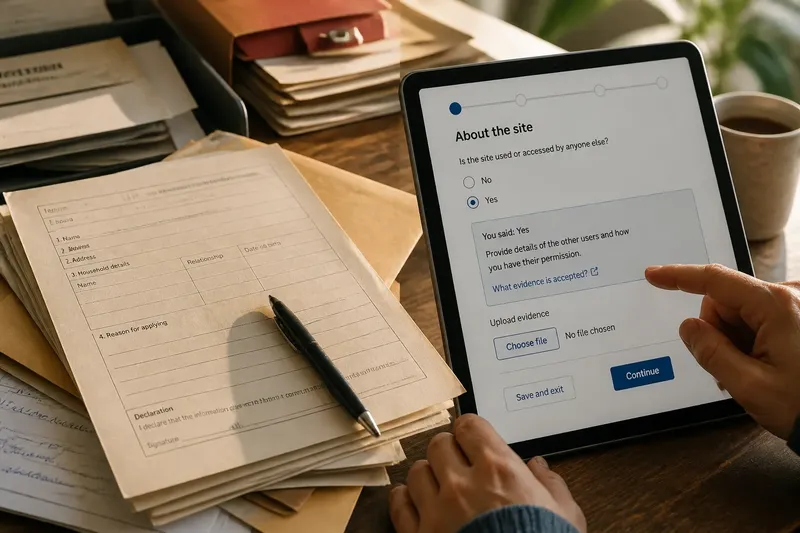
The printed sheet made the agency’s categories visible. A form might ask for a name, address, household details and a reason for applying, each in a specified space. Its layout could signal what mattered: a large box invited a fuller answer, while a small field implied a short one. Yet the same fixed layout had to serve people whose circumstances did not fit neatly into its available lines.
Paper also made the act of giving information relatively separable from the act of assessing it. A person could fill in the form at home, attach documents and send the bundle, while an official later decided whether the response was complete. If a field was blank or unclear, the agency might request clarification by letter or ask the person to return to a counter. The form preserved a record of what had been submitted, but corrections and later exchanges often accumulated around it.
That routine was not simply a limitation. A printed form could be read without a device or network, marked up, copied and retained. Its stable layout could also make versions easy to compare, provided users knew which edition applied. The constraints were physical and administrative: space was scarce, answers were hard to validate at the point of entry, and a changed rule could require new printing and distribution.
Early digital records
Digitisation did not begin with public-facing portals. Agencies first used computers to store, search and process information that had often been collected on paper. In some settings, staff entered details from forms into databases; in others, people encountered downloadable files or electronic versions that still followed the logic of a printed page.
This intermediate period matters because it separates the digital record from the digital interaction. A form could be typed on a computer and submitted electronically while remaining a fixed list of fields. The surface changed, but the underlying exchange still asked everyone to move through much the same sequence, and staff might still need to reconcile that submission with records held elsewhere.
Once information was held in structured digital fields, agencies could search and sort it more readily than a pile of paper files. That created new possibilities for retrieving a previous application or checking whether a required field had been supplied. It also made the design of categories consequential: what the system could count or retrieve depended on how information was represented in the first place.
Think of the difference between a handwritten note saying that someone lives with a relative and a database field asking for a household relationship. The note may contain context that does not fit a standard choice; the field is easier to sort but may require the person to select the nearest category. Digitisation can therefore make information more usable for administration while narrowing how it is expressed.
Portals reshape the exchange
A portal brings the form into a continuing digital interaction. It may guide a person through sections, display instructions beside a question, flag a missing response and let an application be saved before submission. These features change the timing of information gathering: some issues that staff once discovered after receiving a form can be raised while the person is completing it.
The ability to show conditional questions is a more fundamental change than replacing blank lines with text boxes. If a person selects one answer, the next screen can ask for details relevant to that answer and omit sections that do not apply. This can make a long process feel more focused, but it also means the person may not see the full set of questions or categories at once.
Portals can also present information alongside a request. Guidance, examples of acceptable documents and explanations of a term can appear at the point where they are needed. In a paper packet, those explanations might be printed on a separate page or sent in a letter; on screen, they can be placed beside the field, linked from it or displayed when a user asks for help.
Consider an invented situation: Mina is applying for a local permit and begins a portal form that asks about the site. She selects that the site is shared, so the portal reveals a question about permission from the other users and offers a link explaining the requested evidence. The expected observable result is that Mina sees a relevant follow-up instead of an irrelevant block of questions, while the agency receives her answer in a field intended for that information.
That exchange depends on the portal’s categories and pathways. If the available answers do not fit Mina’s situation, a carefully designed conditional flow can still lead her to an unsuitable choice. A paper form can also impose categories, but a portal may conceal later options until a particular route is selected, making it harder to recognise what has been left out.
From entry to presentation
Digital portals change not only what agencies collect but how people encounter a public programme. A printed form usually places the questions in a visible order, even when separate pages or attachments complicate it. A portal controls what appears on each screen, which instructions are prominent and when a person sees the next part of the process.
This changes the practical meaning of an administrative category. On paper, a person might read several options together and decide which is closest. In a portal, a category might appear in a drop-down menu, a sequence of yes-or-no questions or a short explanation followed by a choice. The same underlying rule can therefore feel different depending on whether people see the whole set of options or only a guided route.
Agencies can use digital presentation to make distinctions clearer, but they can also make them harder to inspect. A short prompt may save space yet omit the context needed to answer accurately. A help link may contain the full explanation, but only a person who notices and opens it will see that information. Interface decisions become part of the way policy is communicated, even when the formal rule itself has not changed.
For a reader assessing a portal, the useful question is not only “What does this form ask?” It is also “What does it show before asking, what does it hide until later, and what happens when an answer does not fit?” Those questions reveal how the interface frames the choices available to the person completing it.
What changed in the routine?
The move from paper to portals altered the administrative routine in connected ways. A fixed form collected a set of answers that staff interpreted after submission. A portal can guide entry, apply checks during completion and pass structured information onwards, though the precise arrangement varies between agencies and services.
- Visibility: Paper usually presents a fixed sequence, while a portal can reveal sections conditionally. Check whether users can see what topics the process will cover before they start.
- Timing: A portal can flag omissions during entry; paper commonly leaves checking to a later stage. Notice whether the prompt explains what is missing and how to correct it.
- Expression: Handwritten space can invite open explanation, while structured fields make answers easier to organise. Look for a way to explain a situation that does not match the listed choices.
- Guidance: Printed instructions are part of the document; portal guidance may sit beside a field or behind a link. Check whether essential terms are explained where the decision is made.
- Recordkeeping: A paper bundle may preserve annotations and attached pages, while portal data is commonly organised into fields. Ask how a submitted answer and any supporting material appear in the record.
- Correction: Paper corrections can require a replacement page or follow-up contact; a portal may let a person amend an entry before submission. Check what the system allows after the application has been sent.
These differences do not amount to a simple ranking of one medium over another. They identify where the administrative work moves: from interpreting handwriting to designing fields, from checking a complete bundle to managing a guided sequence, and from explaining a printed category to explaining an on-screen choice.
Questions about digital forms?
When did public forms become digital?
There was no single switch from paper to portals. Agencies digitised records and introduced electronic forms at different times, often keeping paper routes alongside newer systems.
How is a portal different from a PDF?
A PDF may reproduce a fixed form on a screen, while a portal can guide a user through changing questions and checks. The distinction depends on what the service actually does, not simply whether it is online.
Why do portals ask different questions?
Some portals use earlier answers to decide which follow-up questions to display. This can reduce irrelevant prompts, but the available routes still depend on the categories chosen by the agency.
Can a digital form be less clear than paper?
Yes. A portal can hide later sections, rely on unexplained menu choices or place useful guidance behind a link, even while it offers checks that paper cannot. Clarity depends on how the agency presents the questions and supports answers that do not fit.
Reading the medium
The history of public forms is not a clean passage from slow paper to efficient screens. Paper made a fixed administrative request visible and portable; early digital systems made information easier to store and retrieve; portals turned submission into a guided exchange in which questions and explanations could respond to earlier answers.
When you encounter a public portal, read its sequence as part of the programme’s administration. Notice which information is requested, which choices are visible, how instructions are placed and whether there is room to explain an unusual circumstance. That simple reading helps distinguish the policy’s stated requirements from the way its interface asks people to meet them.
The form itself is an administrative record, but its layout is also a small act of public communication. Keeping that distinction in view makes it easier to ask whether a digital service has merely moved an old form onto a screen or changed how people are expected to understand and provide information.